Friday, May 17, 2013

Photo: Beachcombing

Searching for treasure on the Oregon coast...

Beachcombing
Copyright Laura A Knauth, All rights reserved.
Please contact me for any usage or licensing options.

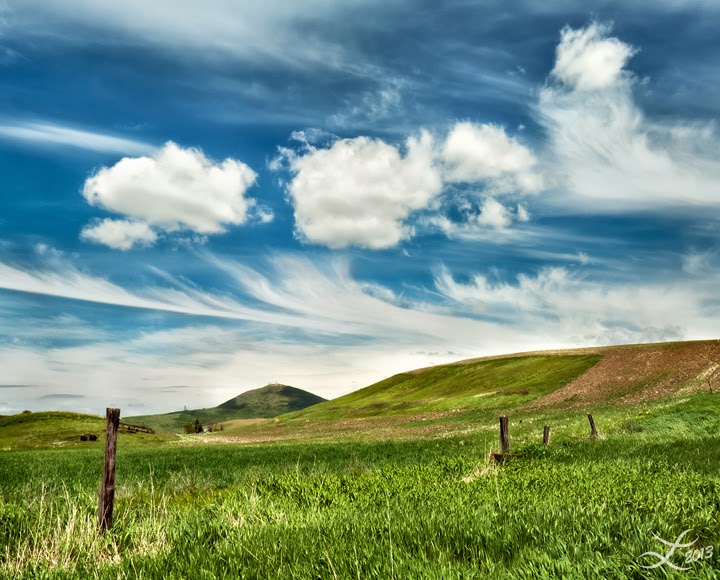
I have to say I really love this image even though it is simple. Typifies the cloudy days that are still beautiful in the Pacific Northwest. This is haystack rock near Cannon Beach, Oregon.

Technical Info
Canon 50d
Canon EF-S 18-200mm Lens, 60mm
f16, 1/10s, ISO 100

Filters:
2-stop Graduated ND Filter
Circular Polarizer

Adding Final Processing Sparkle
A processing technique I've recently found and will start incorporating in all my future images is to add a final tweak to boost the brightest whites of the photo. Seems to really make the image sparkle. I started re-opening a copy of the image in Camera Raw and bumping up the Highlights slider in the Tone Curve tab slightly to the right (starting with +10 or so). I also check whether bumping down the 'Dark' slider slightly to the left adds an appealing effect. Sometimes that can really add richness to the tones.

I've been watching what these sliders do to the tone curve in Camera Raw and have started mimicking that recently in Photoshop directly using a final Curves adjustment layer. Doing this step too soon in post-processing might take away more detail then you intended, so I've been saving these final adjustments to the end. Just wanted to mention this technique because I've realized that just when I thought my images were essentially finished, I found I liked the image much more after trying these final highlight or dark tone tweaks.

Hope you find this useful!

-by Laura A Knauth

Thursday, May 16, 2013

Inspiration + Capability

Having a good idea is not enough. A good idea needs capability as the driving force to bring that idea to fruition. The famous quote is: "Genius is one percent inspiration, ninety nine percent perspiration."

  • Inspiration is akin to picking out your destination on a map.
  • Capability is operating the vehicle that takes you there.

One without the other leads to troubles. Continuing the analogy:
  • Without inspiration, you might drive around aimlessly in circles or endlessly haul someone else around to fulfill their wishes.
  • Without capability, you stay put and dream of lovely places never to be physically seen.

In other words, imbalances in Inspiration + Capability lead toward negative tendencies that trend either towards: Pointless or Pathetic.

The remedy is constant vigilance (taking responsibility for yourself before something else does). Keep trying to optimize through experimentation, notice the results, and iterate ever onward! As you continue down your path, you may decide shift your intended goal, or you may upgrade your transportation along the way, so to speak.

At the moment, I tend to be inclined more towards the inspiration side of things and am constantly trying to improve my capabilities to properly express my intentions. I still have a way to go in that regard, especially since I've recently changed my intention to focus on writing and photography full time. (I was a design engineer for years; and would say my long stint in corporate America was trending way in the opposite direction.) It helps me to think about these two dual goals - merging inspiration with capability - to effectively prioritize my time and energy, eliminating distractions, and at least working to solve the right problems. And as an entrepreneur, it's definitely crucial to realize that even producing good work is not enough; advertising will be a huge component. (Yeah, definitely still a work in progress . . .)

As children, we start out with grand inspiration, but lack experience, the capabilities to achieve those visions. I think it is a crucial life challenge to develop capabilities without loosing sight of our own initial inspiration. I think we are susceptible, especially in the modern environment, for our capabilities to be honed in service of someone else's goals, not our own. A very dangerous blind side. After finishing so many years of earnest training, we might become like little assassins - our capabilities serving to manifest the intentions of another. That may sound dramatic, but it's so easy to become sidetracked. It's a straight up difficult process to 'become who you are'. Talk about a moving target!

And after all, learning capabilities is in a sense like programming yourself. Even admiring someone else's work might dim your own memory of what you wanted to achieve, just as it might also open a door to a toolset that allows you to fulfill your own dreams. It's a tricky balance, but I find keeping in mind these two pillars of inspiration + capability, both together, helps inoculate against pitfalls of distraction or hijacked intentions. I think achieving this balance in stride is true maturity and joy.

In some sense, capability is like the structure that creates the opportunity for your soul's desire to manifest.  Finding and honing the right capabilities to support your own inspiration seems to be the name of the game. Hope these thoughts help you too along the way!

-by Laura A Knauth

Tuesday, May 14, 2013

Photo: Waterfall Flowers

Waterfall Flowers
Copyright Laura A Knauth, All rights reserved.
Please contact me for any usage or licensing options.
Proxy Falls is a huge waterfall with a thundering roar, but some of the cascades separate from the main deluge to create the opportunity for a more intimate scene. Fortunately on cloudy days or for waterfalls in the shade, there is time enough to spend hours trying different perspectives using various lenses (compared to the rush to catch what optimal compositions may reveal themselves at the quickly changing light of sunrise and sunset).
 
For this shot, I tried a close-up down near the mossy rocks at the base of one of the quieter cascades to capture some foreground detail that might otherwise be overlooked viewing the spectacular waterfall at a distance. Here are some sweet flowers popping up over the bank.
 
Location
Proxy Falls (near Sisters, Oregon)
 
Technical Info
Canon 50d
18-200mm Lens, 35mm
f/29, 3.2s, ISO 100, EB +1.7

Filter:  Circular Polarizer
 
 
 -by Laura A Knauth

Monday, May 13, 2013

Thoughts on Workshops

I've taken a couple photography workshops in the past, and I have to say that I do not think they are a worthwhile investment. I actually wasn't even seeking them out, but signed up mainly because several of my photo friends also signed up - I suppose I wanted to be social and convinced myself it could be worthwhile. Most photo workshops are at least several hundred dollars, not including transportation or lodging (both of the workshops I went on were over the weekend, so it involved an overnight stay). That all adds up to what turned into a significant investment (for me anyway). I have absolutely nothing against the workshop instructors; they were good people, and I did come away with a few tips that I still use today. But how much $$ is an idea worth . . . and could you have found out elsewhere? It's not easy to decide; here are my thoughts.

The main issue for me is cost/benefit. Every time I meet up with my friends to go out and take pictures, I learn something new, something valuable. I've heard people say on several different occasions that a main benefit of workshops is it commits you to actually go out on a particular day and take pictures . . . well, you can actually do that on your own, for free, just using discipline. As in: take out a pencil, mark your calendar, and then follow through. Yeah, I don't do that enough myself (I'm still actually working through a huge backlog of photos I've taken, but not processed over the years), but if I ever had an urge to take another photo workshop, I would instead direct that energy to the pencil/calendar approach first. ;p

I've already posted every tip I learned from workshops that I thought was valuable in the Photography topic section of this blog. To recap those: the main two learnings from my past photo workshops were:

Interestingly, both of these tips were not formally part of the workshop, just random things I either overheard on the day or were randomly brought up through a question. I unfortunately also learned tips that I knew from prior research were not right, or led me astray and I've subsequently abandoned. It's a problem when the people leading the workshops are good enough to be impressive, but not yet knowledgeable enough themselves to help you avoid basically amateur pitfalls. I had even asked in one of the workshops about any tips to help organize gear while you are shooting at critical times of the day (since I always seem to be rushing to find a particular filter, or adapter, or lens, and end up missing opportunities); I was told that was something I should work out for myself . . . and I am taking this workshop, why?
Travel By Twilight
Copyright Laura A Knauth, All rights reserved.

Workshops have the mystique that you will learn something incredible that could change your trajectory and transform your craft, but frankly, I've learned incredible things just by chatting with fellow photographers while out on location, reading photo books from the library, or watching YouTube videos and podcasts. At the end of the day, I would have preferred to invest the money I spent at workshops in a new camera lens or gear (heck, even just more batteries or memory cards which I feel guilty about buying but are incredibly useful in a pinch), or transportation & lodging on impromptu photo trips with friends. Some of my favorite photos I've taken far were from one such trip with friends to Death Valley National Park (ie: Fire & Ice, Heavenly Dunes, and Travel by Twilight, among others).

So, in the end, I'd have to say workshops seem like a pyramid scheme to me. At this point, I'm skeptical of taking advice from photographers that make most of their money through other photographers (via workshops), and not from people who are actually buying photographs (which seems to me the ultimate goal). Again, nothing against workshop instructors; it's just that you can probably learn something similar for free by going on photoshoots with fellow photographer friends and mainly experimenting yourself. 

One of the benefits of workshops is the chance to meet a whole new set of photographers. Networking. Seems like producing good images is only the first step, but networking - or who you know - is a huge second component to becoming a successful photographer. (I suppose that's true for most anything, actually.) The issue is whether spending hard earned money on workshops is the most cost effective means to achieve this. There are other ways to meet up with fellow photographers that are not fee-based, after all. 

It's an individual decision, and it's true that you never know where you will find some gem of an idea that will lead you to the fastest improvement. At this point though, I'm inclined to avoid workshops, and focus instead on individual practice (reading books and consistently experimenting with the various techniques) and more photoshoots with friends.

Hope these thoughts are useful :)

-by Laura A Knauth

Sunday, May 12, 2013

Photo: Desert Dreams

This is one of the four larger peaks of the Mesquite Flat Sand Dunes. The larger dunes are tricky because they are a magnet for hikers and usually are covered with footprints. This dune was the one further away from the parking lot and had a nice ridge for catching sunset rays.

Desert Dreams
Copyright Laura A Knauth, All rights reserved.
Please contact me for any usage or licensing options.

I found the dunes to be a very challenging location - seemed to me an exercise in extreme opportunistic photography. The truly beautiful lighting around sunrise and sunset doesn't last very long; by the time you see how the sunlight will play off of the terrain, you inevitably realize your intended comps have footprints in the way, and it is difficult to move quickly from dune to dune to try again. (Quite a workout!) In the end, I found the most success staying planted in a reasonably promising location and making the most of it, even if my initial comp didn't work. I didn't expect so many fluffy clouds for a desert scene, but there they are. ;p

Location
Mesquite Flat Sand Dunes
Death Valley National Park, California

Technical Details
Canon 50d
Canon 18-200mm Lens, 20m
f/13, 1/80s, ISO 100

Filter
I'm pretty sure I used just a Circular Polarizer for this one.

Thanks for stopping by my blog!

by Laura A Knauth

Saturday, May 11, 2013

Midtone Contrast

This is my favorite Photoshop processing technique at the moment: boosting Midtone Contrast using the Unsharp Mask filter. Increasing Midtone contrast removes what looks like a hazy film over your image and I think makes images look much more vibrant.

I haven't posted too much about my processing workflow yet since I’m still significantly tinkering with it. Regardless of what I'm trying though, I add this step somewhere along the way. I've been using this technique for several years, and have yet to find another method I like better. The good news is that Unsharp Mask should be compatible with most any version, even ancient versions, of Photoshop.

Unsharp Mask Midtone Contrast Technique
Since the technique uses an Unsharp Mask filter, I first create a new merged layer (ctrl+alt+shift+e on a PC) to preserve the original background image.

Then select Filter => Unsharp Mask  (optionally, make the layer a smart object first)

The settings for Unsharp Mask have nothing to do with sharpening. Instead, you will do something strange, very strange. The basic template is to essentially make the Radius much bigger than the Amount (and leave the Threshold very low; I like 0).

Unsharp Mask Settings:
  • Radius to the max : 250
  • Threshold to the min: 0 
  • Then vary the Amount to taste.

I start with Amount: 5, but have been known to push it up past 40 depending on the image (for big moves above 10, I sometimes prefer to repeat the process on subsequent Filter layers for a smoother effect, but did it all in one for this example).

Midtone Contrast Example
Left: Original
Right: After Midtone Contrast enhancement 
Unsharp Mask settings shown (Amount:40; Radius 250; Treshold: 0)

Quiet Morning Waves,  Copyright Laura A Knauth

This midtone contrast technique has helped me so much; I don't notice any weird haloes compared to other approaches. I had thought this Unsharp Mask technique was just a poor-man's version of the Clarity slider, but when I finally upgraded to Photoshop CS5, I was so dissapointed at the haloes introduced by the vaunted Clarity slider in Adobe Camera Raw. Turns out, I like the old Unsharp Mask approach for boosting midtone contrast much better!

Caveat: The one big drawback for this approach in my workflow is that this technique uses a filter, not an adjustment layer. Even using 'Smart Objects' in later versions of Photoshop does not really help because it doesn't change the fact that any further tweaks you may make to adjustment layers below this image will no longer propagate to future adjustment layers. For this reason, I try to use this technique at the very start of my flow and then build any adjustment layers on top of it. I might also apply this filter again at the very end to recover clarity lost when reducing the image size for the web.

Second Approach to Midtone Contrast
I also like improve midtone contrast with High Pass filter described below, but it unfortunately has similar potential halo issues like the clarity slider.
  • Create a new Merged Layer (on a PC: ctrl+shift+alt+e )
  • Create Smart Object    (optional, if you have it)
  • Filter => Other => High Pass
  • Set Amount to 50-ish (if it's a smart filter, then you can change this later)
    • Unfortunately, this can also introduce some haloes.
    • I usually spend time trying to clean them up in subsequent layers.
  • Set Blend Mode to Overlay (or Soft Light, or play around with it)
  • Tweak the Layer Opacity to taste
  • Optional: Double click the layer to bring up the dialogue and pull in the Blend If sliders to taste
    • Use Alt to click & drag on the inner most part of the sliders to separate them (according to taste; I usually find a separation of around 30-50 works best for me)
      • This preserves the extreme highlights or shadows

Wrapping It Up
Most of my other processing techniques are in a huge state of flux right now. I've been spending an embarrassing amount of hours tinkering and experimenting. I even just bought a book about the strange and mysterious world of LAB mode - yikes, wish me luck! (And by all means, post any photo processing tips you are willing to pass along, related to midtone contrast or otherwise.) So far, through it all, this Unsharp Mask method of enhancing midtone contrast has been a quick and reliable mainstay for just about every image I process.

Hope this technique helps you too!

-by Laura A Knauth

Wednesday, May 8, 2013

Photo Series: Sea Foam Swirls

You never know what the weather will bring. After a nightlong downpour, and drizzly pre-dawn, the skies began to clear at daybreak to herald a beautiful day for photography, starting with this series of photos from Cape Kiwanda. I played around with different lenses and perspectives, and two different takes on the same location are shown below. 


Sea Foam Swirls
Copyright Laura A Knauth, All rights reserved.
Please contact me for any usage or licensing options.
Location
Cape Kiwanda near Pacific City, Oregon
 
Technical Info
Canon 50d 
Tokina 11-16mm Lens, 11mm 
f11, 6s, ISO 100 

Filters:

General Tip
For the one photo I've sold to a magazine cover (Curve of the Earth), I was very fortunate the magazine was willing to post-process the image to add more sky, extending the horizontal shot vertically, not only to fit the aspect ratio they needed, but also to add more negative space for their magazine content (Title, Article lists, ...). It was a great lesson since I hadn't thought to play around with negative space more often, and many people have a tendency to only shoot landscape shots horizontally.


Quiet Morning Waves
Copyright Laura A Knauth, All rights reserved.
Please contact me for any usage or licensing options.

The tide carried foam patches along the beach in these interesting abstract swirls.

Location
Pacific City, Oregon
Technical Info
Canon 50d 
11-16mm Lens, 16mm 
f/8, 5s, ISO 100 

Filters:

Hope these tips help!

-by Laura A Knauth